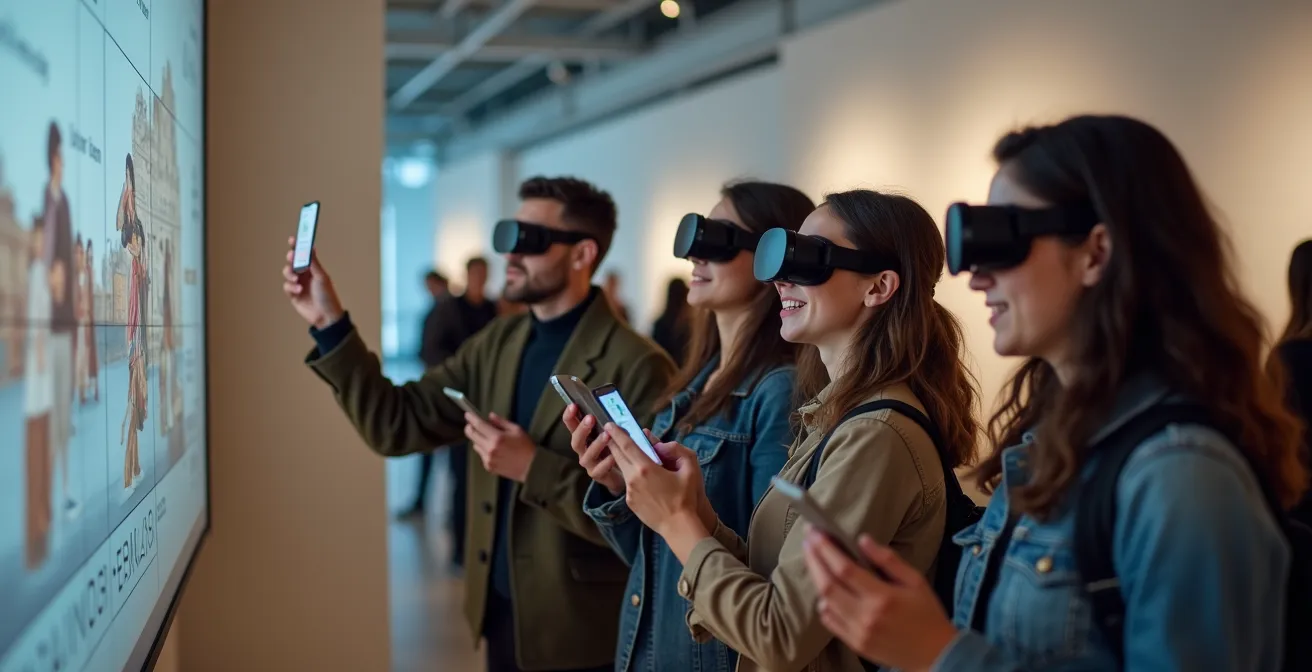
The key to engaging Gen Z with AR in museums isn’t the technology itself, but the curatorial shift from displaying objects to directing immersive, story-driven experiences.
- Augmented Reality boosts visitor retention and engagement by providing narrative context and emotional resonance, far surpassing traditional audio guides.
- Successful implementation requires a new philosophy where curators become “Experience Directors,” using AR to build worlds rather than just label artifacts.
Recommendation: Instead of asking “what can AR show?”, start by asking “what story can AR tell?” Focus on building a narrative architecture for your physical space.
The challenge is a familiar one for museum directors everywhere: how do you capture the attention of Gen Z, a generation raised on interactive, digital-first content, within the hallowed, often silent, halls of a history museum? The default answer for the past decade has been technology, specifically Augmented Reality (AR). The common approach involves developing an app that overlays historical information on artifacts or turns an exhibit into a scavenger hunt. While well-intentioned, this often treats AR as a digital label, a temporary novelty that fails to forge a lasting connection.
Many institutions struggle to move beyond these surface-level applications, facing practical hurdles like battery drain, visitor safety in crowded spaces, and the sheer cognitive load of a poorly designed visual interface. The conventional wisdom suggests that more interactivity equals more engagement. But what if the true power of AR lies not in what it adds to the screen, but in how it fundamentally restructures the visitor’s journey through a physical space? What if the goal isn’t just to make history “exciting,” but to make it emotionally resonant?
This guide moves beyond the gimmick. We will explore the psychological drivers that make AR so effective for retention and learning. We will analyze the practicalities of AR navigation, safety, and device management. Most importantly, we will dissect the profound shift in thinking required to leverage this technology effectively—a move away from object-focused displays towards a future of “experience-first” curation. This is where AR transitions from a feature to a philosophy, turning a passive observer into an active participant in a story that unfolds around them.
To navigate this complex but rewarding landscape, this article breaks down the essential components for creating meaningful AR experiences. The following sections provide a comprehensive roadmap, from understanding user engagement to redefining the very role of the curator in the digital age.
Summary: A Strategic Guide to AR in Historical Contexts
- Why AR Retention Rates Are 40% Higher Than Audio Guides?
- How to Use Live View Maps to Navigate Complex Old Towns?
- Visual Overlays or Soundscapes: Which AR Style is Less Distracting?
- The Safety Oversight When Using AR in Busy Streets
- How to Configure Your Phone to Run AR Apps All Day?
- How Curating Exhibitions Has Shifted From Object-Focus to Experience-First?
- Why Ambient Computing Is the Next Step After Voice Commands?
- How Curating Exhibitions Has Shifted From Object-Focus to Experience-First?
Why AR Retention Rates Are 40% Higher Than Audio Guides?
The significant leap in visitor engagement with AR isn’t just about flashy visuals; it’s rooted in cognitive psychology. Unlike passive audio guides that simply narrate facts, AR integrates information directly into the user’s field of view, creating a powerful sense of spatial presence. The historical content is no longer an abstract story but a tangible layer on reality. This connection is why studies report that 84% of visitors feel more engaged and find exhibits more memorable with AR. The brain processes this integrated information more effectively, leading to higher knowledge retention.
The core difference lies in the shift from extrinsic to intrinsic motivation. An audio guide often feels like a lecture, a task to be completed. A well-designed AR experience, however, sparks curiosity. It encourages exploration by rewarding the user’s movement and attention with new discoveries, turning learning into a game of discovery. It’s the difference between being told about the Roman Forum and “seeing” its structures rebuilt on their foundations as you walk through them. This power to create immersive narratives is what makes experiences like the “Horizon of Khufu,” which drew over 250,000 visitors, so successful; they don’t just present history, they allow visitors to inhabit it.
Furthermore, AR enables adaptive storytelling. The experience can change based on a user’s path, how long they linger at an exhibit, or even answers to in-app quizzes. This personalization makes the content feel more relevant and directly addresses the user’s interests, a stark contrast to the one-size-fits-all script of a traditional tour. This tailored journey fosters a deeper emotional connection, transforming a historical tour from a passive lesson into a personal adventure.
Ultimately, AR’s higher retention rate is a direct result of its ability to make the visitor the protagonist of their own historical exploration, a role far more compelling than that of a passive listener.
How to Use Live View Maps to Navigate Complex Old Towns?
Navigating the labyrinthine streets of a historic city center or a sprawling museum campus is a common point of friction for tourists. Traditional 2D maps force users to constantly switch their attention between the map and their surroundings, breaking immersion. AR-powered “Live View” maps solve this by overlaying directional cues—arrows, pathways, and points of interest—directly onto the real-world view through a smartphone’s camera. This creates a seamless, intuitive guidance system that feels less like reading a map and more like following a futuristic guide.

As seen in the image above, this technology allows visitors to keep their heads up and engage with the architecture around them while still receiving clear directions. Pioneering applications, like the one developed by VisitBritain, enhance this by not just navigating, but also storytelling. As a visitor walks, the app can automatically display how buildings looked in different eras or highlight hidden historical details, dynamically recalibrating the experience based on the user’s location. This transforms a simple walk from point A to B into a chronological journey.
However, this powerful tool comes with a critical caveat: divided attention. While AR navigation enhances spatial awareness of the destination, it can reduce awareness of immediate, dynamic obstacles like other pedestrians or traffic. In fact, research shows participants spent on average 86% of their time looking at their smartphone screen while walking with AR navigation. This underscores the need for careful design that prioritizes not just efficiency, but also safety, a challenge we will explore later in this guide.
The goal is to create a tool that guides without distracting, enriching the user’s perception of the historical environment rather than pulling them out of it.
Visual Overlays or Soundscapes: Which AR Style is Less Distracting?
Choosing the right AR modality is crucial for designing an experience that enhances, rather than overwhelms, a museum visit. The two primary styles, visual overlays and audio-based soundscapes, offer distinct advantages and trade-offs regarding engagement and cognitive load. Visual overlays are potent for conveying complex spatial information, such as reconstructing a collapsed ruin or showing the inner workings of a historical machine. However, a screen cluttered with text and graphics can easily become distracting, pulling the visitor’s focus away from the physical artifact itself.
On the other hand, AR soundscapes use spatial audio to place sounds in the environment—the clang of a blacksmith’s hammer, the murmur of a Roman market—that trigger the imagination without monopolizing the visual sense. This approach has a much lower cognitive load and is inherently more accessible, particularly for visually impaired visitors. While potentially less direct for conveying factual data, soundscapes excel at creating atmosphere and emotional context. The most effective approach is often a hybrid one, where the technology adapts to the user and the context.
As futurist Sienna Smith notes in the Augmented Reality Travel Journal, the next frontier is about personalization: “AR, combined with AI and machine learning, promises to deliver even more personalized and engaging experiences. Adaptive storytelling: AR that adjusts in real-time based on visitor preferences and behaviors.” This points towards systems that might use a visual overlay for a complex interactive exhibit but switch to a minimalist soundscape while the visitor is simply transiting through a gallery.
This table, based on a recent comparative analysis of AR modalities, breaks down the key differences:
| AR Type | Engagement Level | Cognitive Load | Accessibility Score |
|---|---|---|---|
| Visual Overlays | High for sighted users | Moderate to High | Limited for visually impaired |
| Soundscapes | Moderate across all users | Low to Moderate | High for visually impaired |
| Hybrid Adaptive | Highest overall | Adjustable | Universal design compliant |
Ultimately, the least distracting style is the one that serves the narrative goal most efficiently, providing the right information at the right time, through the right sense, without breaking the visitor’s immersion in the real world.
The Safety Oversight When Using AR in Busy Streets
While AR navigation offers unprecedented convenience, it introduces a significant safety challenge: “attentional blindness.” When a user is engrossed in a digital overlay, their awareness of their physical surroundings can diminish dramatically. This is a manageable concern within the controlled environment of a museum, but it becomes a critical oversight when AR experiences extend into busy public streets, historic squares, or outdoor heritage sites. The risk of users walking into traffic, tripping on uneven surfaces, or colliding with other pedestrians is real and must be a primary consideration for any app developer or tour operator.
The design of the AR interface itself plays a huge role in perceived safety. For instance, field experiments revealed that 76% of participants think transparency of the interface elements directly affects their sense of safety. Opaque, screen-filling graphics create a sense of unease and disconnect, while minimalist, translucent overlays allow users to maintain better peripheral vision of their environment. This suggests that less is more when it comes to designing for safety in dynamic public spaces.
Beyond interface design, a proactive approach to safety involves structuring the AR experience geographically. This means intentionally designing the user’s journey to minimize risk. Rather than allowing for constant, intensive AR interaction, designers should create a rhythm of engagement and awareness. This can be achieved through a combination of smart design and clear user guidance.
Action Plan: Designing a Safer AR Experience
- Establish ‘AR Hotspots’: Designate specific, safe zones away from pedestrian flow (like plazas or quiet courtyards) where users are encouraged to engage with more intensive AR content.
- Create ‘Transit Corridors’: In high-traffic areas, the app should automatically switch to a minimalist mode, providing only essential navigation cues (like haptic feedback or simple audio) to guide users between Hotspots.
- Implement Sensory Cues: Use non-visual alerts, such as a phone vibration or a specific sound cue, to prompt users to look up from their screen at regular intervals or when approaching an intersection.
- Use Peripheral Awareness Design: Design interfaces with subtle glows or pulses at the edge of the screen to convey information without requiring direct focus, keeping the user’s central vision free to scan their environment.
- Include an Automatic Safety Mode: Leverage GPS and computer vision to detect when a user is in a high-traffic area (e.g., crossing a street) and automatically pause or minimize the AR experience until they are in a safer location.
By designing for “heads-up” moments as much as “heads-down” interactions, creators can deliver a compelling AR journey that is both immersive and responsible.
How to Configure Your Phone to Run AR Apps All Day?
One of the most significant practical barriers to the widespread adoption of all-day AR experiences is battery life. The intense processing required for simultaneous localization and mapping (SLAM), camera use, and 3D rendering makes AR applications notoriously power-hungry. Indeed, an industry analysis shows that AR apps use 20-30% more battery than standard apps performing similar tasks. For a tourist hoping to use an AR guide from morning until evening, this presents a major challenge that can cut their experience short.
From the user’s perspective, some basic “digital hygiene” can make a significant difference. Simple steps include starting the day with a full charge, carrying a portable power bank, lowering screen brightness, and closing all other background applications. Disabling unnecessary features like Bluetooth or Wi-Fi when not actively needed can also claw back precious percentages. On modern smartphones, enabling low-power mode can automatically throttle background processes, though it may sometimes impact the performance of the AR app itself.

However, the most impactful optimizations must come from the developer side. Building a power-efficient AR app is a complex balancing act between performance and consumption. For museum directors commissioning an app, it’s crucial to ensure their development partners are implementing these power-saving strategies. Key techniques include reducing the frame rate from a smooth 60 FPS to a perfectly acceptable 30 FPS, which can dramatically cut down on GPU load. Another powerful method is optimizing the render resolution; even a small reduction can save milliseconds of processing time per frame, adding up to significant battery savings over an hour.
Advanced strategies involve designing for “graceful degradation.” This means the app is smart enough to monitor the device’s battery level and automatically scale back its features. For example, it could disable complex animations or reduce asset quality when the battery drops below 30%, eventually falling back to a simple, low-power map mode when the battery is critical. This ensures the user is never left completely stranded, even if the full AR experience is no longer possible.
By combining user diligence with smart development, it is possible to create rich AR experiences that can last as long as the visitor’s curiosity.
How Curating Exhibitions Has Shifted From Object-Focus to Experience-First?
The integration of technologies like AR is not just an add-on; it’s a catalyst for a fundamental philosophical shift in museum curation. For centuries, the curator’s primary role was that of a keeper and scholar of objects. The exhibition’s goal was to display artifacts in a logical, often chronological, order, with success measured by the breadth and importance of the collection. The visitor was a passive observer, expected to read labels and appreciate the object’s inherent historical value.
The “Experience-First” approach turns this model on its head. The primary goal is no longer simply to display an object, but to create an immersive narrative that forges an emotional connection between the visitor and the story behind the object. The visitor is transformed from a passive observer into an active participant. As one museum design expert noted, the real change is in “how and why stories are being told… The shift in narratives to focus on human stories and narratives with empathy, changing context and fresh eyes is also something that has created a need for new approaches to storytelling.”
In this new paradigm, the curator’s role evolves from “Keeper of Objects” to “Experience Director.” Their job is to architect a journey, using the collection as a set of props in a larger, multi-sensory story. Technology like AR becomes a powerful tool in this process, used not just to provide information, but to build worlds, evoke emotions, and provide context that a glass case never could. Success is no longer measured by collection size, but by visitor engagement, dwell time, and emotional feedback.
This table illustrates the core differences between the two curatorial philosophies:
| Aspect | Object-Focus Approach | Experience-First Approach |
|---|---|---|
| Primary Goal | Display artifacts | Create immersive narratives |
| Visitor Role | Passive observer | Active participant |
| Technology Use | Supporting labels/audio | Integrated AR/VR experiences |
| Curator Role | Keeper of objects | Experience director |
| Success Metrics | Collection size | Visitor engagement & retention |
This change requires a new set of skills, blending traditional historical expertise with principles of user experience design, narrative design, and technological fluency.
Why Ambient Computing Is the Next Step After Voice Commands?
If the current generation of AR apps represents a conscious interaction with technology—requiring users to hold up a phone—the next evolutionary step is ambient computing. This is a paradigm where technology recedes into the background, becoming so seamlessly integrated with our environment that it feels invisible. After mastering voice commands that allow us to interact without touch, the next frontier is a system that anticipates our needs and delivers information contextually, without any explicit command at all.
For museums, this is the endgame for creating truly immersive experiences. The struggle to attract younger audiences is real; latest demographic data shows museums struggle with 18-24 year olds while more easily attracting older demographics. Ambient computing offers a solution by removing the technological friction that can be a barrier to immersion. Imagine walking into a room dedicated to medieval life, and as you approach a suit of armor, you hear the subtle clank of metal and the distant sound of a blacksmith’s forge through lightweight, discreet smart glasses or earbuds. No phone required, no buttons to press. The environment simply reacts to your presence and gaze.
This “calm technology” allows the focus to return entirely to the physical space and the emotional narrative. As the Arts Management and Technology Lab explains, this deeper integration can “enhance engagement to be more internal and emotional, moving away from the mere text and interpretation of written history.” By making the technology invisible, the experience becomes more magical and profound. The visitor is no longer “using an app”; they are simply present in a historically enriched environment.
While full implementation is still on the horizon, the principles of ambient computing—context-awareness, minimal intrusion, and seamless integration—should already be guiding the design of today’s AR experiences, paving the way for a future where technology serves the story, not the other way around.
Key Takeaways
- AR boosts engagement by creating narrative context and emotional connection, not just by displaying information. Its success depends on making the visitor the protagonist.
- Effective AR design must manage cognitive load and physical safety. This involves choosing the right modality (visual vs. audio) and creating safe interaction zones.
- The true revolution of AR in museums is the curatorial shift from being an “Object-Keeper” to an “Experience Director,” using technology to architect immersive, story-driven journeys.
How Curating Exhibitions Has Shifted From Object-Focus to Experience-First?
As we’ve established, the move toward experience-first curation represents a fundamental change in the mission of museums. It’s an acknowledgment that in a world saturated with information, the unique value of a museum is its ability to provide not just knowledge, but also context, emotion, and a shared human experience. This concluding section examines this principle in practice, showing how the role of the curator is becoming one of a master storyteller and world-builder, with AR as a key instrument in their toolkit.
The curator as an “Experience Director” synthesizes historical accuracy with narrative design. Their process begins not with the question “What objects do we have?” but with “What story do we want to tell, and what emotions do we want to evoke?” The collection then becomes the vocabulary used to tell that story. This approach has given rise to exhibitions that are more dynamic, participatory, and memorable. A prime example is the Design Museum’s “The World of Tim Burton” exhibition. Visitors could use their phones to explore a “space-themed Burtonesque fantasy” in the museum’s atrium, an AR experience that didn’t just comment on the artist’s work but immersed visitors in his unique creative universe. It was a perfect fusion of physical space and digital imagination.
This new role demands a collaborative, multidisciplinary approach. The modern curator works alongside UX designers, narrative writers, 3D artists, and developers. Their expertise is the anchor that ensures historical integrity, while the technical team builds the vessel for the narrative journey. It is this synergy that allows a simple historical artifact—a soldier’s letter, a piece of pottery, an ancient tool—to become a portal to another time, animated with the human stories that give it meaning.
For museum directors and cultural leaders, the path forward is clear. To make history exciting for Gen Z and future generations, you must empower your curators to be more than keepers of the past; you must challenge them to become the architects of unforgettable experiences. Start by defining the stories only your collection can tell, and then explore how technology can help you tell them in the most compelling way possible.